
The Asset Mix widget can also display a mix of negative and positive total market values and weights for asset classes in a portfolio. Negative total market values and portfolio weights appear (in red) to indicate an amount that the portfolio holder owes to a broker (e.g. as a Short Position) at the set As of Date.
Note: A short position is when an investor borrows shares of a stock from a broker and sells those shares in the market, intending to buy them back at a lower price on the broker’s behalf. A short position’s value is the difference between the price the shares are sold for and the shares’ price in the market. While the investor waits to buy these shares back, they owe that difference to the broker.
When the table presents a mix with both negative and positive total market values, the following display options for class weights are available:
-
Absolute Weight – The percentage of a portfolio a class makes up, disregarding its positive or negative value (calculated using the absolute value of all classes in a portfolio)
-
Holding Weight – The percentage of a portfolio a class makes up as a positive or negative number (calculated using the positive and negative total market values of all classes)
You can set either option by clicking the left-most arrow at the top of the widget and then clicking an option in the Percentage Weight menu that appears (see Figure 1). Regardless of which option you set, the total weight of all classes will still be 100% in both the table and pie chart.
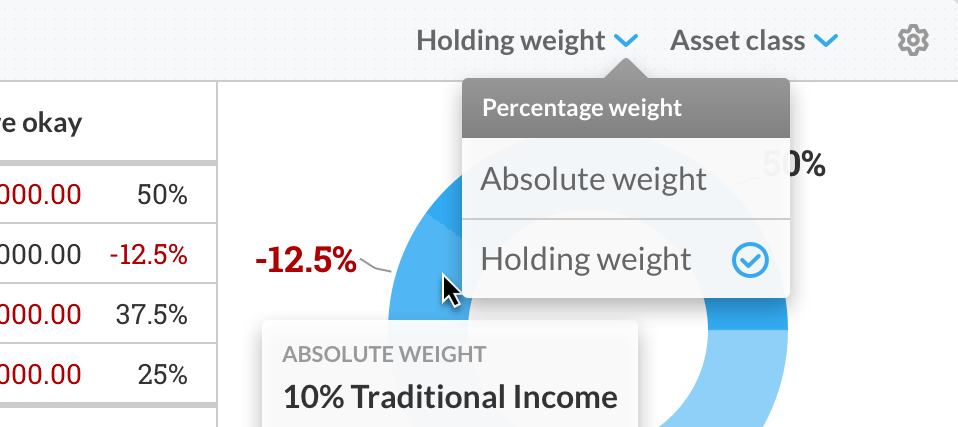
Figure 1 - Setting the percentage weight
Note: When the Holding Weight option is set, any asset class with a negative weight is represented in the pie chart as a section of the chart with a negative percentage appearing next to it. Hovering over any section that represents an asset class with a negative weight reveals the Holding Weight and Absolute Weight of that class.
By default, the widget is set to Holding weight, so you can see how the investments made in a class are actually held (i.e. a negative weight of a positive sum of total market value, and vice versa, means holdings in that class are in a short position).
Selecting Absolute weight will display all class weights as absolute percentages despite any class having a negative total market value. This lets you immediately understand how a portfolio’s investments are divided by class, regardless of whether a class has a negative total market value.