
After you set a date range, the widget displays a portfolio’s total change in value and the value of the different types of transaction activities and/or market changes that contributed to the portfolio’s change in value during that range.
That total change in value is listed in a box on the left-hand side of the widget. This box includes an equals sign that connects it to boxes displaying the values of the different types of transaction activities and market changes, which in turn connect to each other with plus signs.
This illustrates how a portfolio’s total change in value is the sum of different types of transaction activities and market changes’ values.
The different types of transaction activities and market changes include:
-
Market Change – The negative or positive movement in the total market value (market value + accrued) of securities and cash held in the portfolio
-
Net Contributions – Value of deposits minus withdrawals the account holder made to the portfolio
-
Capital Gain/Loss – Total profit or loss that occurred as a result of all buy and sell transactions
-
Miscellaneous – Sources of change to your portfolio other than what is listed above
All values shown in dollars and percentages are accurate up to two decimals places. If an activity or market change did not contribute to the change in a portfolio’s value, a dash appears in the corresponding box instead of any value.
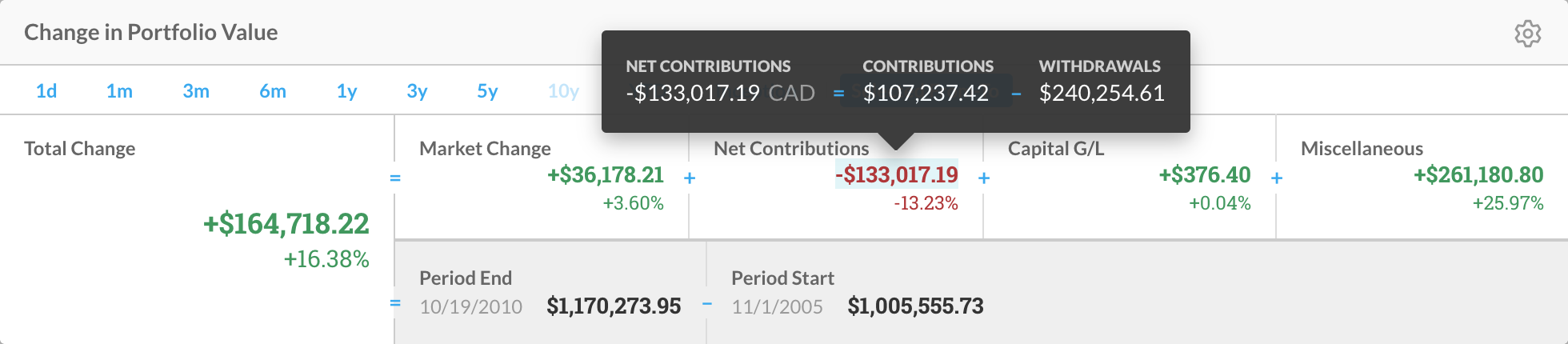
Figure 1 - Hover over any dollar value in the widget to reveal a tooltip that defines activity or market change and provides a breakdown of the value
The widget also includes Period End and Period Start boxes, which list their respective dates and the portfolio’s value on those dates. The Total Change box connects to these two boxes with an equals sign, and these boxes connect to each other with a subtraction sign. This illustrates, in exact figures, how the total value of the portfolio you are viewing changed during the time period set.
Note: If the total value of a portfolio remains the same through the time period set, the widget will display a change of $0 and 0%.