
The transactions displayed in the widget can be sorted either chronologically or into categories. You can sort transactions by doing the following:
-
Click the arrow in the top right-hand corner of the widget
-
Select either option in the View Options menu that opens
When transactions are sorted chronologically, you can filter the widget to display only one specific type of transaction by clicking the leftmost arrow at the top of the widget and then selecting a transaction type in the Filter Types menu that appears.
When transactions are sorted into categories, the widget groups different types of transactions together based on their similarities (e.g. Deposit Cash and Transfer Cash In transactions are both listed under the Client Contributions category because they are both incidents of an investor making contributions to their portfolio). Categories are listed in the widget with a heading that includes the name of that category and a number in brackets indicating how many transactions are under that category. Also, the total Converted Amount of all the transactions in a category is displayed under each category listed in the widget. This lets you see the total amount of money that was moved in or out of an account’s portfolio based on the transactions in a category (see Figure 1).
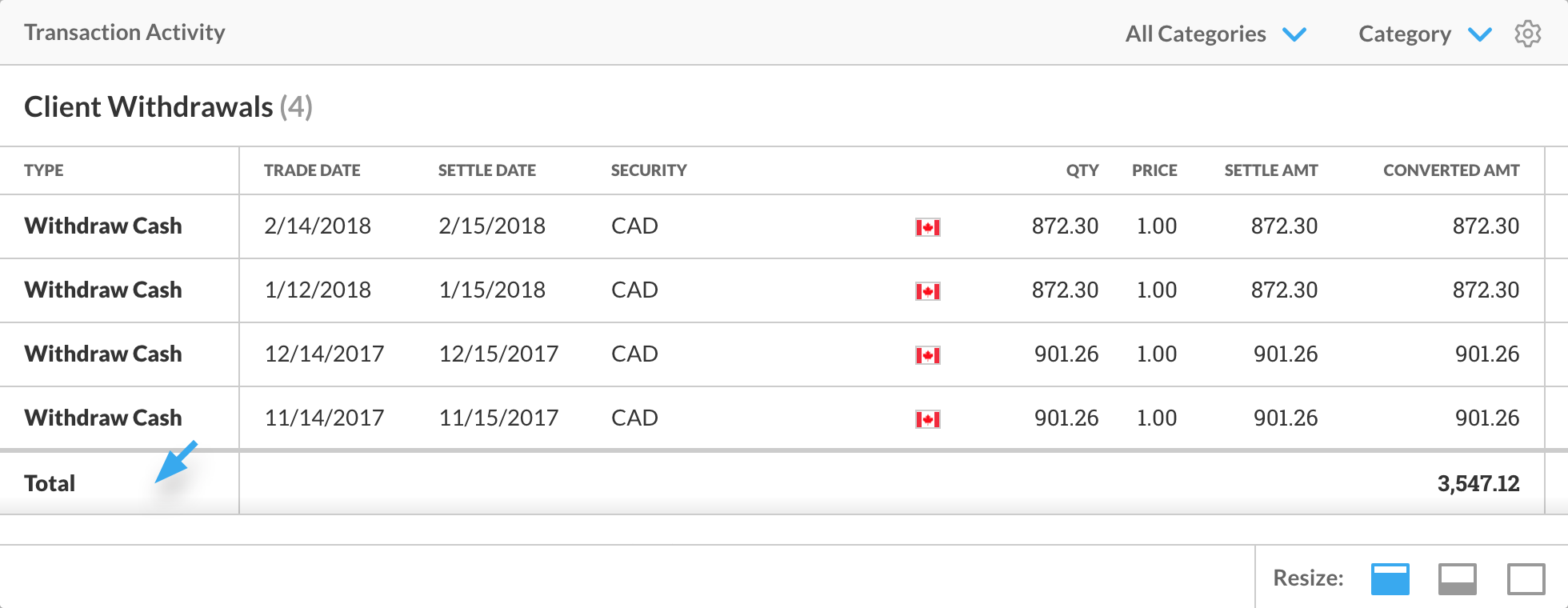
Figure 1 - The total row in the Transaction Activity widget.
When transactions are sorted into categories, you can also filter the widget to display only one specific transaction category by clicking the left-most arrow at the top of the widget and then selecting a category in the Filter Types menu that appears.
Transaction categories include:
-
All Categories
-
Buy Transactions – Transactions where the account holder purchased securities
-
Client Contributions – Instances where an account holder added money or securities into their portfolio
-
Client Expenses – Fees and taxes an account holder had to pay for owning securities
-
Client Withdrawals – Instances where an account holder withdrew money or securities from their portfolio
-
Income, Dividends Paid and Fund Distributions – Payments made to the account holder for owning certain securities
-
Miscellaneous Transactions – Any other transactions besides those listed here
-
Sell/MaturityTransactions – Transactions where the account holder sold securities they owned
Note: When you first sign in to Client Portal, the Transaction Activity widget lists all transactions in reverse chronological order, unfiltered by type.